The Manage Files tool is a file management system for your course.
Use this area to upload files to your course. You can organize your files into folders, creating a folder for each module of content. Students cannot access this area.
To access the Manage Files area:
- Click Content. Drop the arrow down beside Update/Create
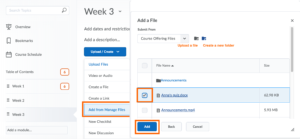
- Click Add from Manage Files
- From the pop-up window, select the required file
- Click Add
Alternatively, click Course Admin and select Manage Files from the Course Administration area.
You can create a New Folder by clicking the folder icon at the top of the pop-up, or upload files to the Manage Files area.
