Kaltura media platform is not intended to be used for long-term data storage or backup of media that is not in use. Content owners are expected to retain original media files as their own backup on your personal device. Any inactive media content in Kaltura will be automatically moved to your Kaltura Recycle Bin. The criteria to be moved are:
- Content that is created older than 2 years from the current time, AND
- Content that has not been played for 2 years (0 play)
During the 30-day window, you can restore the media from the “Recycle Bin” to your My Media library. After 30 days, the content will be permanently deleted from the Kaltura platform.
If you have any questions, please feel free to reach out to SLATE Team via email at slatehelp@sheridancollege.ca.
Frequently Asked Questions
- How will I be notified that my media is moved to the recycle bin?
- You will receive an email notification that your inactive media is moved to your Recycle Bin on My Media page.
- How do I restore a video from the Recycle Bin?
- Log in to SLATE
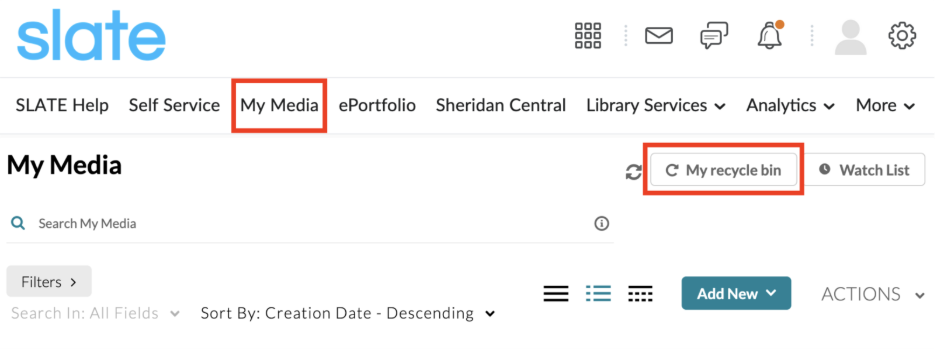
- Click My Media tab from SLATE home screen
- Click My recycle bin button to view your media
- Click ACTIONS > Restore button
