The Self Check folder is intended for students to submit several draft versions of their assignments before the due date for a specific assignment. Students can change their work before submitting the final paper to the assignment folder. The draft submissions are not stored and will not be added to the Copyleaks database.
Enable Self-Check Folder
Create your assignment as normal. We strongly recommend to name the assignment ‘Self-Check,’ as this is consistent with all our messaging and documentation.
- When enabling Copyleaks, choose Advanced Options.
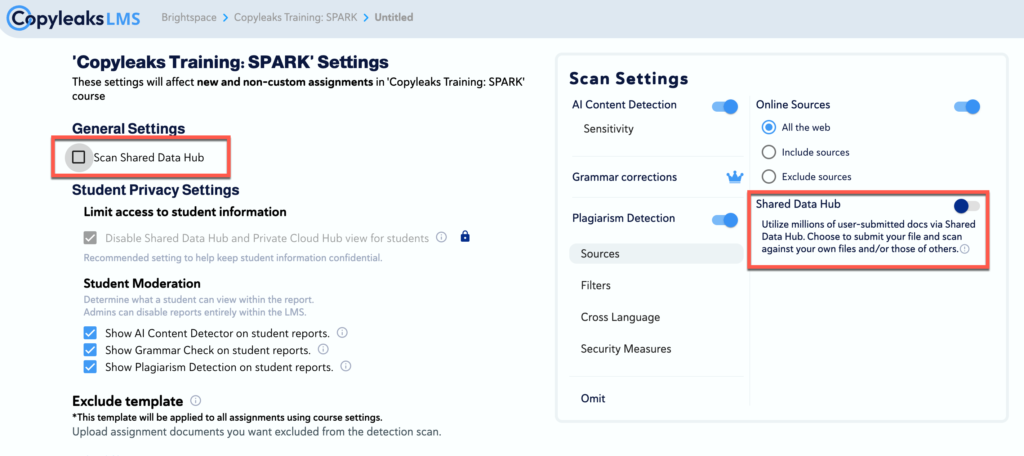
- Under General Settings, uncheck the box labeled Scan Shared Data Hub. This action will also disable the corresponding option under Shared Data Hub, as these two settings are linked and work together.
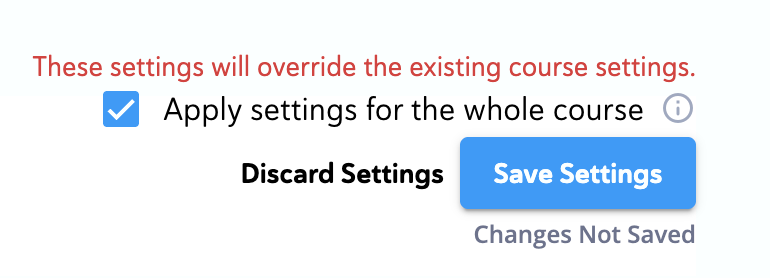
Save Settings: The Save button is located in the bottom-right corner. The Save settings have recently been updated. By default, Apply settings for the whole course is enabled, which means the same settings will be used for any new assignments created. When creating a self-check folder, please ensure this option is unchecked.